> ## Documentation Index
> Fetch the complete documentation index at: https://dify-6c0370d8-fix-zh-token-context-terminology.mintlify.site/llms.txt
> Use this file to discover all available pages before exploring further.

# ステップ 4：ファイルのアップロード

> このドキュメントは AI によって自動翻訳されています。不正確な部分がある場合は、[英語版](/en/cloud/use-dify/knowledge/knowledge-pipeline/upload-files) を参照してください。

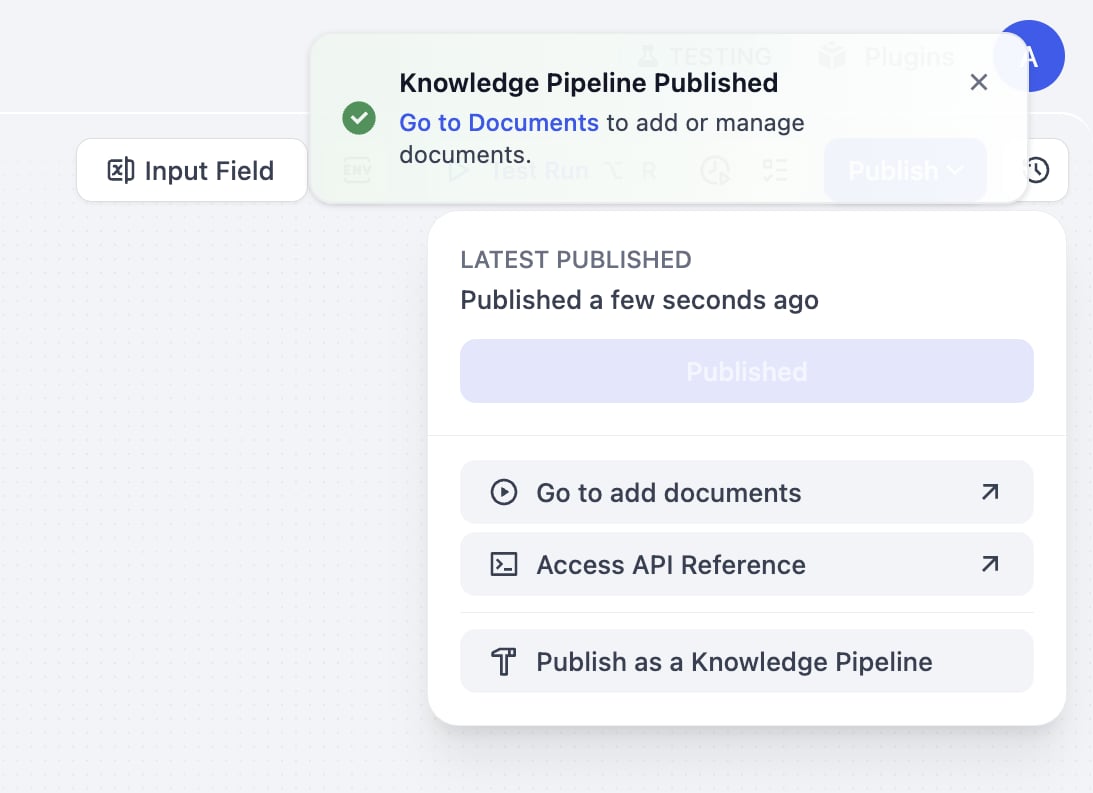
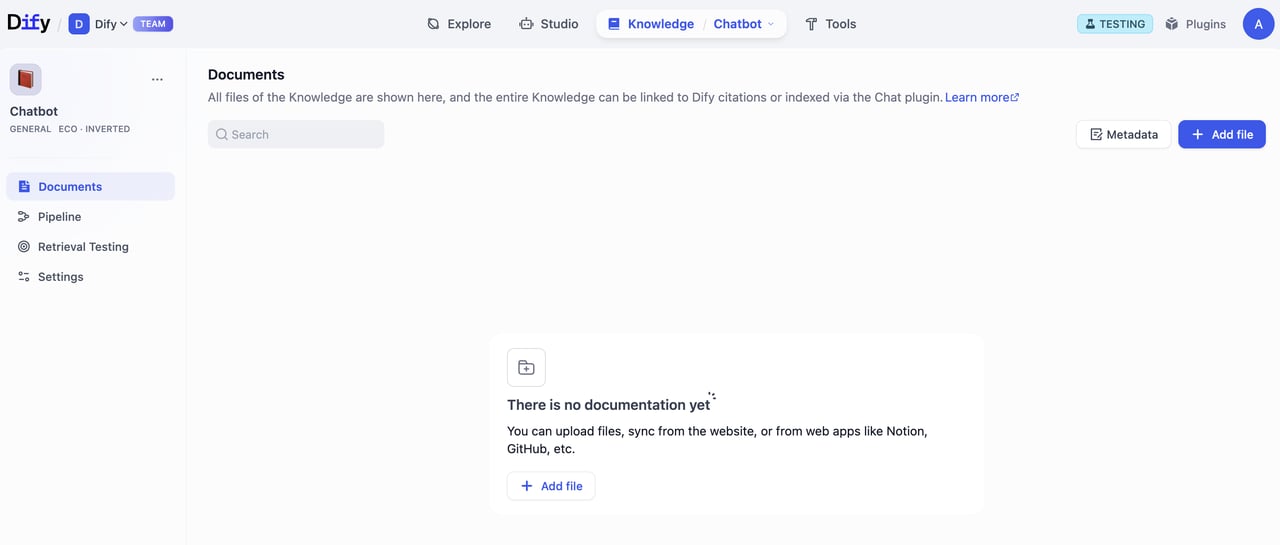
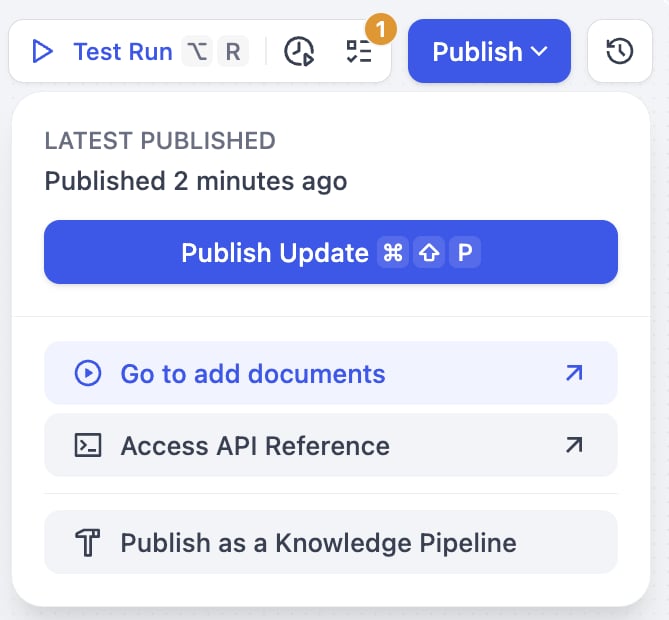
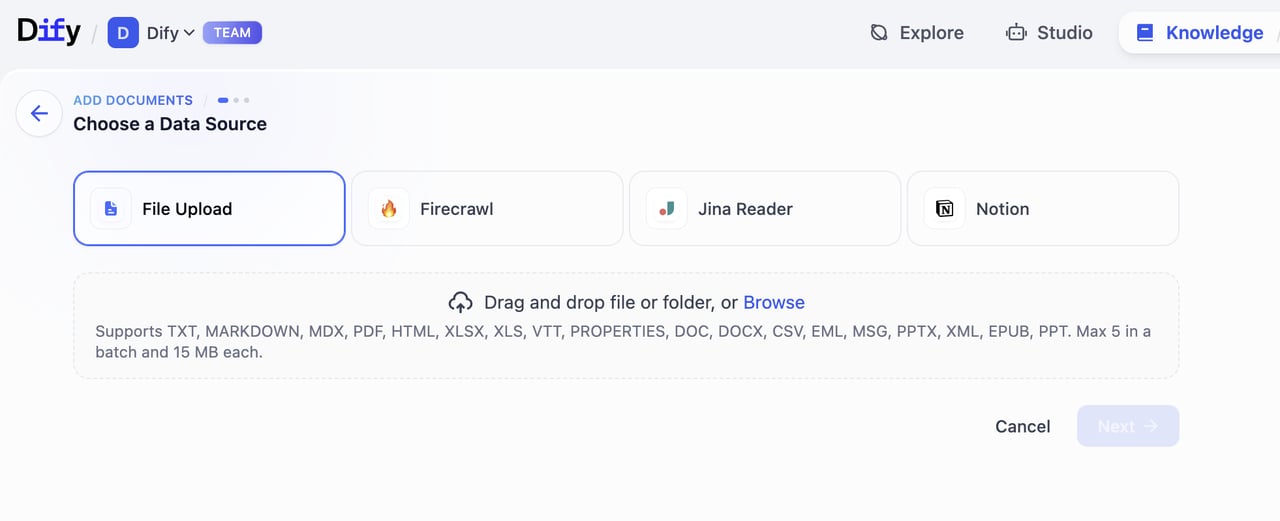
ナレッジパイプライン公開後は、以下 2 通りの方法でファイルをアップロードできます。

A. 公開成功通知内の **ドキュメントへ移動** をクリックし、ドキュメントページで **ファイル追加** からアップロードします。

<div style={{display: 'flex', flexWrap: 'wrap', gap: '30px'}}>
  <div style={{flex: 1, minWidth: '200px'}}>
    <Frame>
      <img src="https://mintcdn.com/dify-6c0370d8-fix-zh-token-context-terminology/hiugpcWvqthZv7Tx/images/use-dify/knowledge/create-knowledge-pipeline-14.png?fit=max&auto=format&n=hiugpcWvqthZv7Tx&q=85&s=b0d00a231c94468720575e9b063dd5e4" alt="方式A-1" width="1093" height="793" data-path="images/use-dify/knowledge/create-knowledge-pipeline-14.png" />
    </Frame>
  </div>

  <div style={{flex: 2, minWidth: '300px'}}>
    <Frame>
      <img src="https://mintcdn.com/dify-6c0370d8-fix-zh-token-context-terminology/hiugpcWvqthZv7Tx/images/use-dify/knowledge/create-knowledge-pipeline-15.png?fit=max&auto=format&n=hiugpcWvqthZv7Tx&q=85&s=aa96950d4d19b9863bfe85f3a6c7269b" alt="方式A-2" width="1280" height="545" data-path="images/use-dify/knowledge/create-knowledge-pipeline-15.png" />
    </Frame>
  </div>
</div>

B. **ドキュメント追加へ移動** をクリックしてファイルをアップロードします。

<div style={{display: 'flex', flexWrap: 'wrap', gap: '30px'}}>
  <div style={{flex: 1, minWidth: '200px'}}>
    <Frame>
      <img src="https://mintcdn.com/dify-6c0370d8-fix-zh-token-context-terminology/hiugpcWvqthZv7Tx/images/use-dify/knowledge/create-knowledge-pipeline-16.png?fit=max&auto=format&n=hiugpcWvqthZv7Tx&q=85&s=bf71a404ce3cfc673ca497f33cc9b615" alt="方式B-1" width="669" height="620" data-path="images/use-dify/knowledge/create-knowledge-pipeline-16.png" />
    </Frame>
  </div>

  <div style={{flex: 2, minWidth: '300px'}}>
    <Frame>
      <img src="https://mintcdn.com/dify-6c0370d8-fix-zh-token-context-terminology/hiugpcWvqthZv7Tx/images/use-dify/knowledge/create-knowledge-pipeline-17.png?fit=max&auto=format&n=hiugpcWvqthZv7Tx&q=85&s=a42d4c00a0114f3984165202738d87a3" alt="方式B-2" width="1280" height="521" data-path="images/use-dify/knowledge/create-knowledge-pipeline-17.png" />
    </Frame>
  </div>
</div>

### アップロードの流れ

1. **データソースの選択**\
   パイプラインで設定したタイプから選択します。Dify は現在、4 種類のデータソース（ファイルアップロード（PDF、DOCX 等）、オンラインドライブ（Google Drive、OneDrive 等）、オンラインドキュメント（Notion）、ウェブクローラー（Jina Reader、Firecrawl））をサポートしています。
   追加ソースは[Dify Marketplace](https://marketplace.dify.ai/)からインストール可能です。

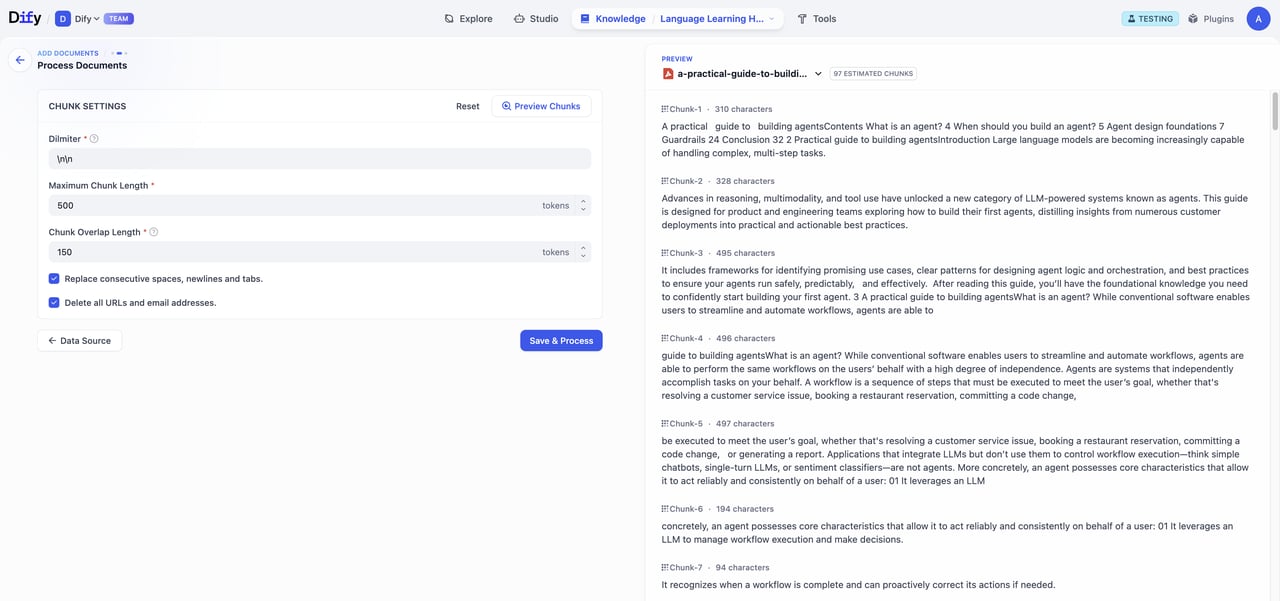
2. **処理パラメータの入力・プレビュー**\
   パイプライン構築時にユーザー入力フィールドを設定していれば、ここで必要なパラメータ・変数を入力します。フォーム入力後、「プレビュー」をクリックすると分割結果を確認できます。「保存して処理」を押すとナレッジベースの作成とデータ処理が始まります。

   <Warning>
     **重要な注意点**：チャンキング構造はパイプライン設定で固定されており、ユーザー入力パラメータでは変更できません。
   </Warning>

   <Frame>
     <img src="https://mintcdn.com/dify-6c0370d8-fix-zh-token-context-terminology/hiugpcWvqthZv7Tx/images/use-dify/knowledge/create-knowledge-pipeline-18.png?fit=max&auto=format&n=hiugpcWvqthZv7Tx&q=85&s=425a58d25a9764f3f3cd1431522a901c" alt="パラメータ入力" width="1280" height="601" data-path="images/use-dify/knowledge/create-knowledge-pipeline-18.png" />
   </Frame>

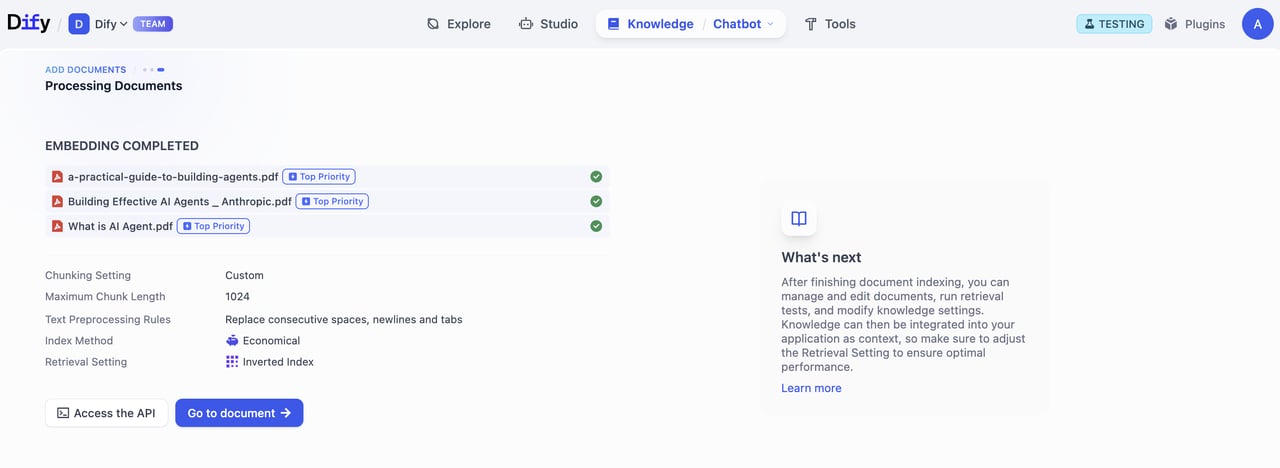
3. **ドキュメント処理**\
   ドキュメント処理の進捗を追跡できます。埋め込み処理が完了したら「ドキュメントへ移動」をクリックしてください。
   <Frame>
     <img src="https://mintcdn.com/dify-6c0370d8-fix-zh-token-context-terminology/hiugpcWvqthZv7Tx/images/use-dify/knowledge/create-knowledge-pipeline-19.png?fit=max&auto=format&n=hiugpcWvqthZv7Tx&q=85&s=0861a5d5cd74a6c2f3b29993e91913f9" alt="処理進捗" width="1280" height="468" data-path="images/use-dify/knowledge/create-knowledge-pipeline-19.png" />
   </Frame>

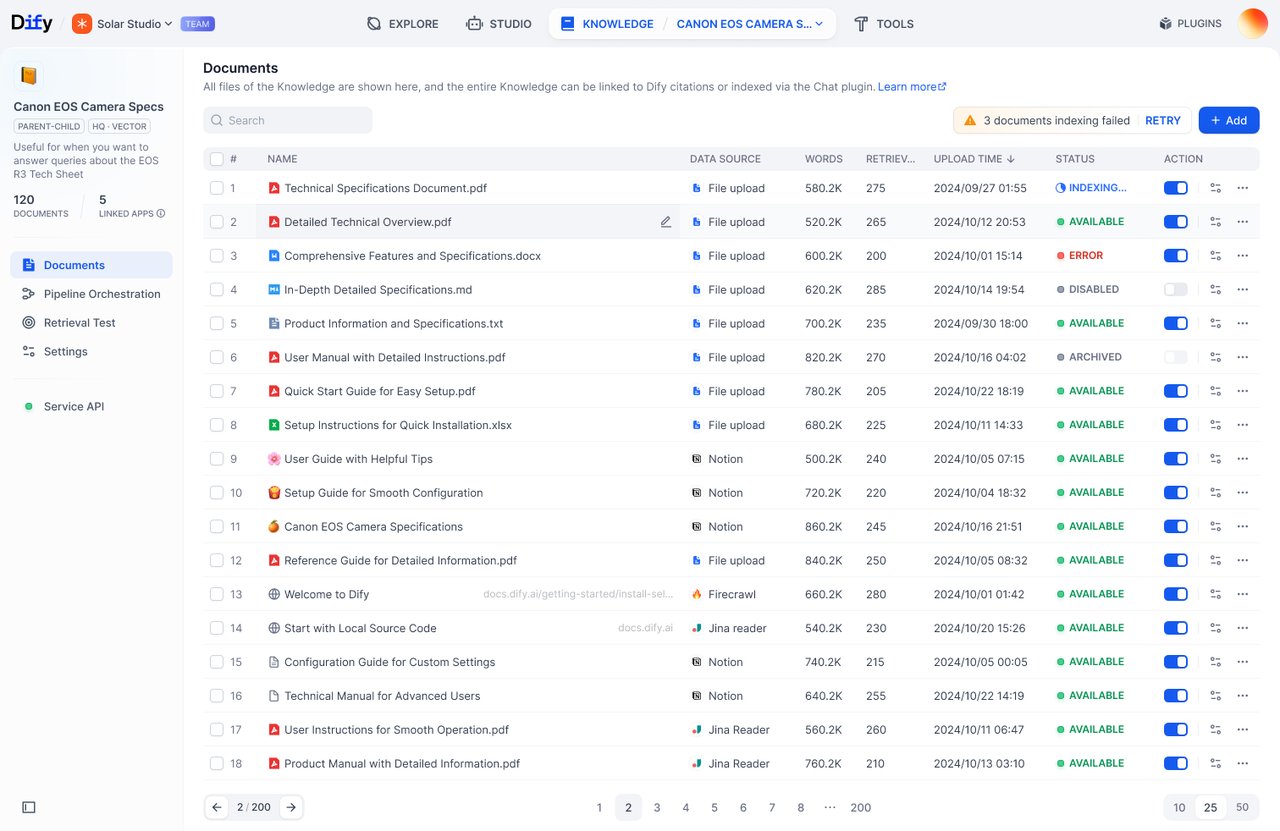
4. **ドキュメントリストの確認**\
   「ドキュメントへ移動」をクリックするとドキュメントページが表示され、アップロードしたファイルや処理状況が確認できます。
   <Frame>
     <img src="https://mintcdn.com/dify-6c0370d8-fix-zh-token-context-terminology/hiugpcWvqthZv7Tx/images/use-dify/knowledge/create-knowledge-pipeline-20.png?fit=max&auto=format&n=hiugpcWvqthZv7Tx&q=85&s=4b0a278e3961bdea3fa2bf407a70e2f1" alt="ドキュメントリスト" width="1280" height="831" data-path="images/use-dify/knowledge/create-knowledge-pipeline-20.png" />
   </Frame>